The world's first Qualcomm Snapdragon 888-powered smartphone, the Xiaomi Mi 11, has been released in China. The device boasts an impressive specifications sheet: 6.81 inches AMOLED panel with a 3200 x 1440 resolution and 120Hz refresh rate, an under-screen fingerprint sensor, a triple camera system with a 108MP main sensor, a 5MP telephoto unit, and a 13MP ultrawide module, and a 4,600mAh battery with support for 55W wired and 50W wireless charging.
The base variant with 8GB of RAM and 128GB of storage costs 3,999 Chinese Yuan (~$612). Western prices haven't been announced yet.
According to Xiaomi executive Pan Jiutang (via Xiaomi Today), the Mi 11 costs the same to make as the iPhone 12. The 128GB variant of the phone retails for 6799 Chinese Yuan in China and $879 in the US.
This makes the iPhone 12 nearly $429 more expensive in China.
Unlike the iPhone 12, the Mi 11 can be bought as part of a bundle that includes a charger at no extra cost.
Although Xiaomi hasn't revealed Mi 11's BoM, we do know that the company has pledged to keep profit margins low. Apple and Samsung, on the other hand, are known to keep hefty margins on their phones.
This also explains why Apple captured 59 percent of the industry profit in Q2 2020, even though it was the third largest player and made up only 14 percent of the total shipments.
Xiaomi's competitive pricing strategy has helped it find success in two of the world's largest smartphone markets - China and India. In the third quarter of 2020, the company toppled Apple as the third-largest smartphone manufacturer. This was largely because Xiaomi aggressively tried to seize Huawei's market share and Apple's shipments suffered because of the delay in the launch of the iPhone 12 series.
Foldables, rollables and more
With any luck, 2021 will be a whole lot better than 2020 was, but at the very least there are loads of exciting smartphones to look forward to.
From high-profile handsets like the iPhone 13 to oddities like the LG Rollable, there should be something for everyone. Below, we’ve highlighted ten of the most interesting options that we’re expecting to see before the end of the year.
These are phones that in most cases are likely to be great, and at the very least should be interesting, unusual, or innovative.
Samsung Galaxy S21 range
The Samsung Galaxy S21 and its likely siblings – the Samsung Galaxy S21 Plus and Samsung Galaxy S21 Ultra – are probably the most highly anticipated Android phones. There shouldn’t be long to wait for them either, as it’s rumored that the Samsung Galaxy S21 range could be announced as soon as January 14.
So what should you expect from the three phones? It almost goes without saying that they’ll have cutting-edge power, with rumors suggesting they’ll pack either the Snapdragon 888 chipset (in the US) or the Exynos 2100 (in most other places) – both of which are likely to be among the year’s most powerful.
The most exciting upgrade though might be support for the S Pen stylus on the Samsung Galaxy S21 Ultra, a rumored move that could bring the phone a lot closer to the Galaxy Note range. We’re also hearing talk of high-spec cameras, with the S21 Ultra potentially offering 10x optical zoom.
iPhone 13 range
The iPhone 13 range is probably even more highly anticipated than the Samsung Galaxy S21 range, but there’s rather longer to wait for these phones, as they probably won’t land until September.
There could be some big upgrades for these new models, with high refresh rate screens, 1TB of storage, in-screen fingerprint scanners, and a smaller notch all rumored. There’s also talk of a periscope camera being added, which would allow for an increased optical zoom range.
With the phones being a long way off at the time of writing though, we’re not at all confident of these things yet. What you can be sure of is that they’ll be very powerful, and that Apple will probably offer the same assortment of handsets as in the iPhone 12 range – meaning an iPhone 13, an iPhone 13 mini, an iPhone 13 Pro, and an iPhone 13 Pro Max.
OnePlus 9 range
The OnePlus 9 range is likely to land in March or April and offer a slightly cheaper way to get the sort of cutting-edge tech we’re expecting to see in phones like the Samsung Galaxy S21.
There will probably be a OnePlus 9, a OnePlus 9 Pro, and possibly also a totally new model dubbed the OnePlus 9E.
As for what to expect, all three phones might use the top-end Snapdragon 888 chipset, and they’ll probably also have high refresh rate screens, with the Pro model likely offering at least 120Hz.
We don’t know a huge amount else about them yet, but leaks suggest the standard OnePlus 9 will have a 48MP main camera, a 48MP ultra-wide one, and an unknown third lens, as well as 8GB of RAM and 128GB of storage, while the OnePlus 9 Pro will probably be the only one of the three to have IP68 certification for water and dust resistance.
Samsung Galaxy Z Fold 3
The Samsung Galaxy Z Fold 3 isn’t likely to be as mainstream as most of the phones on this list, but it could be more exciting than most of them, as foldable phones are probably the future, and the Samsung Galaxy Z Fold 3 is likely to be the best one yet.
Beyond having a big, foldable screen, the main Samsung Galaxy Z Fold 3 rumors so far suggest it might support Samsung’s S Pen stylus, have an in-screen camera, and possibly even have an RGB light strip on its hinge.
We haven’t heard much else at the time of writing, but expect more rumors to roll in ahead of release, which could be in June if leaks are to be believed - though some sources reckon it won't land until the second half of the year.
LG Rollable
The LG Rollable is very much a wild card, not least because we’re not at all sure it even exists. But there is some evidence that LG is developing a phone with a rollable screen, and that it might be out sometime in 2021.
Based on a patent, this might be a device that lets you extend the left and right screen edges, but because it rolls rather than folds, and because the mechanism is compactly hidden within the phone, it might look much like a normal smartphone when the screen isn’t extended. According to another leak it might extend from 6.8 inches to 7.4 inches.
A trademark application for the ‘LG Rollable’ name meanwhile includes mention of “electronic touch screen pens”, so as with the Galaxy Z Fold 3, you might be able to get a stylus for it.
The LG Rollable sounds ambitious and we haven’t heard much about it yet, so there’s every chance it won’t land in 2021, and if it does it will probably be very expensive, but it certainly sounds interesting. The only release date rumor for it so far states that it could land in the first half of the year.
Oppo Find X3 range
Oppo isn’t as big a name as Samsung or OnePlus, but in recent years it’s been making phones that rival their best, and the Oppo Find X3 range could be the next ones to do that.
In fact, they might actually be more exciting and innovative than most of the big-name flagships, as rumors suggest the Oppo Find X3 Pro will have a macro camera that could function a bit like a microscope, with 25x zoom and lights around the lens.
The phone might additionally have NFC that works on both the front and back of the handset, so you can tap the screen against payment terminals rather than the rear – a small feature perhaps but one we’ve not really seen before.
Beyond that the specs sound top-end through and through, with talk of a 3K resolution, a high refresh rate screen, fast charging, loads of camera lenses, and more. And you shouldn’t have to wait long, as we’re expecting the Oppo Find X3 range to launch early in the year.
Nokia 10
We’ve been waiting for the Nokia 10 for a long time, so much so that it’s gone through a few names since it started being rumored – originally it was thought to be launching as the Nokia 9.1, but as time went on that changed to Nokia 9.2, 9.3, and now Nokia 10.
Whether 2021 will be the year it lands remains to be seen, especially since we still don’t really know much about it yet, but rumors point to an in-screen selfie camera, a sapphire glass display, a stainless steel frame, and a top-end Snapdragon 888 chipset, so this could be a very premium phone.
There’s also talk of it having a very different camera setup to the penta-lens Nokia 9 PureView, though in what ways it will differ is unclear.
iPhone SE 3
While the iPhone 13 range is clearly the most anticipated of Apple’s upcoming phones, the company might also launch a successor to the iPhone SE (2020) in 2021.
We’ve heard very little about the iPhone SE 3 so far and there’s every chance we won’t see it until a later year, but if it does launch in 2021 it will probably have an A14 Bionic chipset (the same as the iPhone 12 range).
There’s also talk of an iPhone SE Plus, which might end up being the iPhone SE 3 in all but name. This is thought to have a larger 5.5 or 6.1-inch screen, but to retain the general affordability of the iPhone SE range. What’s not clear is whether the iPhone SE 3 will keep the physical home button and big bezels – a design that’s becoming increasingly dated.
Samsung Galaxy Note 21 range
The biggest question about the Samsung Galaxy Note 21 range is whether it will even launch, with rumors swirling that Samsung is looking to add stylus support to the Galaxy S21 Ultra and Galaxy Z Fold 3 so that it can discontinue the Note range.
At this point it looks likely that the Note range’s days are numbered, but we might still get a Samsung Galaxy Note 21.
There’s not really any news on what it will offer yet, but as usual for the range you can expect an S Pen stylus, a big screen to make the most of it with, and plenty of power. If the Samsung Galaxy Note 21 does launch we’ll probably see it in or around August.
Sony Xperia 1 III Compact
As well as the expected Sony Xperia 1 III there are rumors that the company might launch a Sony Xperia 1 III Compact, and it’s this phone that we’re more excited about, as there aren’t many high-end compact phones that days.
Rumors suggest it might have a 5.5-inch screen and an upper mid-range chipset – though we’d hope for a high-end one. We don’t know much else yet about either the Compact or the standard Sony Xperia 1 III, but with the phones possibly launching in the first half of the year we’ll hopefully learn more before long.
The Amazfit Neo is now official. Inspired by retro digital watches, the Neo sports a monochrome screen with modern comforts . The device is out there for ~$40 in China.
On the rear of the Amazfit Band 5‘s recent debut, wearable maker Huami has now officially announced the Amazfit Neo. The wearable has appeared on online stores round the end of August, but the device has now received its official send-off by the Chinese company.
Heavily inspired by classic digital watches of old with some modern touches, the Neo sports a 1.2-inch monochrome LCD display housed during a chunky plastic body. The always-on screen should leave easy reading in direct sunlight but also sports a backlight for reading in dimmer environments.
The screen doesn’t support touch inputs though, so you’ll need to navigate its software using four physical buttons mounted on its flanks. These details likely increase its long battery life. They claim that normal typical people will get around 4 weeks lasting charge with capacity of 160mAh battery. If you employ the watch sparingly, that figure are often extended to well beyond a month.
The Neo also seems to be a reasonably capable fitness tracker on paper, featuring around-the-clock heart-rate monitoring, activity tracking, sleep tracking, and 5 ATM water resistance. Neo supports basic features like call and messaging but for the avid runners , they are not getting onboard GPS. This smartwatch is known for the long battery life. And is counted in watches with lingest battery life.
The Amazfit Neo is currently priced at 279 yuan (~$40) in China but is additionally available for $49 on Amazfit’s AliExpress store.
https://www.profitablecpmnetwork.com/bj7c0fgt3?key=d997d7edbf84051012b8f09b8a8802a9
Huawei has just officially announced that, from next year, their smartphones will run their own HarmonyOS instead of Android!
HUGE move - can't wait to see a third big player in this smartphone space!
Huawei has just officially announced that, from next year, their smartphones will run their own HarmonyOS instead of Android!
— Arun Maini (@Mrwhosetheboss) September 10, 2020
HUGE move - can't wait to see a third big player in this smartphone space! pic.twitter.com/2sfSa1wMvw
Stick with us to know Huawei New OS release date exclusively earlier, and to know some more stuffs like about Harmony OS download,Harmony Os apps,and more cool stuffs about it.
Soon Huawei launches their own os we will bring Huawei Operating System Reviews,
Searches related to Huawei new os
If you liked this post then a like would be incredibly helpful .
You might have been wondering on when Internet was born,what country invented the internet,how internet evolved . If you feel the same then you are in a good place to know all about it.

When you clicked on this post, your computer sent a message to a computer at Blogger that might be states or countries or continents away. It didn’t know how to get the message there, but it sent it anyway. The message probably arrived after about half a second and told Blogger’s computers to search for a file -- a set of ones and zeros practically indistinguishable from the billions all around it -- and to send that file back to you. Blogger’s computers then sent the file back to your computer piece by piece, where those ones and zeros were interpreted as the start of a post. And the ones and zeros are still streaming in, even while you’re reading the post. It’s pretty amazing, when you think about it.
And if you’re curious how we ended up in a world where billions of computers are all interconnected through this strange structure that we call the Internet, then you’re in the right place. Because this is the start of a mini-series
of posts about the history of the Internet, from some of the first attempts at making
computers work together all the way through modern social networks and on-the-go video conferences. Developing the right combination of software,
hardware, technology, and marketing took decades, so we won’t be able to talk about every important engineer and invention. But we hope you’ll join us as we investigate some of the crucial ideas and events along the way. People started making computers work together pretty early on — as far back as World War II, when computers were big, clunky machines that didn’t do much more than solve really difficult math problems. Even with the best computers of the day, it could take months to solve just one of the complicated physics problems involved in making the atomic bomb.
But a team led by physicist Richard Feynman found a way of solving a bunch of problems at once: when computers weren’t being used for part of one problem, they had those computers work on part of a different problem. So one problem might still take a month, but they could also solve three or four in the same amount of time. And for really important calculations, they used their system to simultaneously do the same problem a whole bunch of times. That way, they were sure of the final answer -- even if a couple computers made mistakes along the way.
Another early step came in the 1950s and 60s, when colleges started separating their computer terminals, where someone would type their program, from the computers themselves. This made it easy for lots of different people to experiment with the new machines while keeping the circuits and tubes safely away from tinkering hands. It was almost like an early form of today’s cloud computing, where a user-friendly computer sends complicated tasks to better, less accessible
computers somewhere else. Except that today’s cloud uses the Internet, and in 1960, there was no Internet.
But people were starting to think about it. The US Department of Defense had recently created the Advanced Research Projects Agency, also known as ARPA, to keep its technology a step ahead of the Soviets. And a computer enthusiast named Joseph Licklider helped convince ARPA to fund research into a computer network connecting scientists and engineers throughout the country. A few key colleges agreed to be involved, and ARPA started building the network in 1969. They called it ARPANET. It started fairly small, as a sort of messaging service between computers at UCLA, UC Santa Barbara, Stanford University, and the University
of Utah. But it was the first network of its kind. And as ARPANET grew over the next couple decades, its engineers would add features and solveproblems that still shape everything we do online.
One of ARPANET’s first big innovations was what’s known as packet switching. You know how sometimes in old movies, when someone wants to phone a friend they have to call a switchboard operator first? The operator was there because those phones worked by what’s called circuit switching, where signals could only get from one place to another if there was a single uninterrupted circuit between them. So the operator’s job was literally to plug the wire from one phone into the wire from another. Circuit switching works great if two places stay connected for a long time, like they might be for a phone call, which is why most phones still work through circuit switching — except that now the circuits move automatically instead of manually. But it would be totally impractical for the internet to work that way. Your computer would only be able to connect to one other computer at a time, and it would take extra time whenever you tried to connect somewhere else.
Some modern websites might connect you to ten different computers from around the world at the same time.All of them need to respond immediately if you click, all the while connecting and monitoring hundreds or thousands of other visitors at
once. So circuits all over the place would constantly be flipping around, connecting somewhere for a split second before switching away and connecting elsewhere. It just wouldn’t work. Even back in the 1960s, engineers knew that computers send messages far too quickly to make circuit switching practical.
So instead, they invented an alternative: packet switching, where different computers send messages along the same set of wires instead of each getting one. To communicate with each other, they just send a message, called a packet, along the wires. Every packet had a kind of address label: a string of numbers representing the computer where it was headed. The computer where it started would look up the address on a table with all the addresses in the network on it, and then send the packet toward whatever nearby computer was closest to the destination. That second computer would get the packet, look up the destination address, and again send the packet in the right direction. This process would repeat over and over until the packet finally got where it was going. No moving circuits or wires, no one-conversation-at-a-time requirement.
ARPANET used packet switching from the start, and its packets traveled over phone lines. And at first, packet switching worked exactly as planned. But there were problems over the next couple of years, as dozens of new computers from around the country joined. Because the way the packet switching system was set up meant that every computer always had to keep an updated list of all the other
computers’ addresses. Otherwise, they’d get packets and wouldn’t know where to send them, or they’d try to send a packet somewhere that might not be around any more. But the network kept getting bigger and bigger, and sometimes a computer’s address might change if they temporarily isconnected from the network or a connection stopped working.And different computers ended up with different
address books if they didn’t update fast enough.
So ARPANET’s engineers scrapped that system and selected Stanford as the official record-keeper of everyone’s addresses in 1973. This quick fix let ARPANET keep growing throughout the seventies, with sixty computers in 1974 and over a hundred by 1977.Soon, satellites connected California and Hawaii, stretching ARPANET to what had been one of the most isolated places in the world. Then, ARPANET jumped across the pond, extending the network to England and Norway. But by the mid-seventies, ARPANET wasn’t the only network in town.Similar networks were popping up around the world, and some had even more computers on them. But everyone formatted their packets differently, so even though you could connect different networks together, it was a real headache. The problem was mostly solved back in 1974, but it took until the early eighties before ARPANET and most of the other networks started using it.
The solution was a set of programs called TCP/IP, or Transmission Control Protocol/Internet Protocol, which we still use today. The Transmission Control Protocol was a standard way of formatting packets, so that everyone was speaking the same language. And the Internet Protocol was a standard way of assigning addresses, so there wasn’t any confusion about where packets were headed. Once two networks used TCP/IP, connecting them became way easier. So all the different networks were connected to one another, forming what became known as the Internet — with ARPANET as the glue holding it all together. But with ARPANET growing so quickly and connecting to so many other networks, the record-keepers at Stanford were getting overloaded.
Hosts were always joining and changing addresses and trying to download the updated address book, and occasionally the Stanford list would have errors that messed up communication throughout the network. And sending emails was becoming a real pain. Email was invented back in 1971, and by 1973 emails made up more than three quarters of ARPANET’s packets. But different computers had different email programs, and some required a list of every computer it would pass between sender and receiver -- so people had to keep an updated map of the entire network by their desk, and they had to type out the path of their email before they could send it.And with hundreds of computers on ARPANET and over a thousand across the Internet, keeping up those maps was getting impossible.
ARPANET’s engineers realized that the entire structure of the Internet had to be reorganized, so they came up with the Domain Name System, or DNS. Instead of separating each host and storing their addresses in a random order, the hosts were arranged into domains. First came the top-level domains -- those dot-coms and dot-edus at the end of every website and email address. The new top-level domains meant that instead of sending an email to john@example like you would’ve before DNS, you were emailing john@example.com.Then, within these top-level domains, each host was called a second-level domain.So “mit.edu”, for example, now meant “the second-level domain ‘mit’ within the top-level domain ‘dot-edu’”.The domain structure organized all those different hosts from all around the world in a way that computers could handle. Then, DNS added a whole new network to the Internet whose whole job was to keep track of addresses and connections.
One computer on the new network effectively stored all addresses within the dot-com top-level domain, another got all the dot-edus, another got all the dot-orgs, and so on. Then, other new computers collectively mapped out the entire network. So when you wanted to send an email, you didn’t have to check your map and plan out all the connections yourself. That became the DNS’s job — and it’s still the DNS’s job today. It’s why your computer didn’t know how to get a message to YouTube when you clicked on the video. It basically just told the DNS server that
it had something for the domain “youtube” within the top-level domain “dot-com”. And the DNS server did the rest. By the late 1980s, the Department of Defense
realized that it had long-since accomplished its goal.
Originally, they just wanted a few reliably interconnected computers, but they ended up serving as the backbone of a global network of thousands of universities, companies, and governments all talking to each other. So they decided to end the ARPANET project, and they needed to find someone to take over all those wires — someone to run the Internet. But who could be trusted with all that power? And could the internet, this huge complicated system, become accessible to the general public?
These were the big questions plaguing the Internet in 1989, and that’s where we’ll pick up in the next episode of this series. In the meantime, thanks for reading this
blog post.
Searches related to how was internet made
what country invented the internet
simple history of the internet
when was the internet born
history of internet
when was the internet made public
evolution of internet
history of internet summary
history of internet for students
Samsung has launched a new range of portable and internal SSDs for its user base in India. The new T7 portable SSD starts at Rs 9,999 for 500GB and goes up to Rs 29,999 for 2TB. The 1TB model retails for Rs 17,999. Whereas the 870 QVO SSD comes in four variants, 1TB, 2TB, 4TB, and 8TB. The prices are Rs 9,999, Rs 17,999, Rs 39,999, and Rs 74,999. Let’s talk about the specifications and further details about these new SSDs.
Samsung T7 Portable SSD – Specifications
Equipped with USB 3.2 interface with backward compatibility, it offers up to 10Gbps data rate. The drive weighs at 58 grams and supports UASP mode. It comes with a transfer speed of up to 1,050MB/s. Speaking about the security, it comes with AES 256-bit hardware data encryption. There is password protection at the software level, and it is compatible with Samsung portable SSD software 1.0.
This portable drive will come in three colours, metallic red, indigo blue, and titan grey. As far as the connectivity is concerned, it has a USB Type-C to C, type-C to A. Samsung offers three years limited warranty on its T7 portable SSD.

Samsung 870 QVO SSD – Specifications
The 870 QVO SSD has a SATA interface with a 6 Gbps transfer rate. The form factor is 2.5-inch, and it a V-NAN 4-bit MLC (QLC). The controller is Samsung MKX, and notes that it comes with a variety of DRAM according to the storage models. The 1TB model will come with 1GB LPDDR4, and the numbers increase as the storage is increased. Samsung made this internal SSD available in four capacities, 1TB, 2TB, 4TB, and 8TB.
The sequential read/write speed is up to 560/530MB/s, while the
random read/write speed is up to 98K/88K IOPS. It will be working on
Samsung Magician management software.
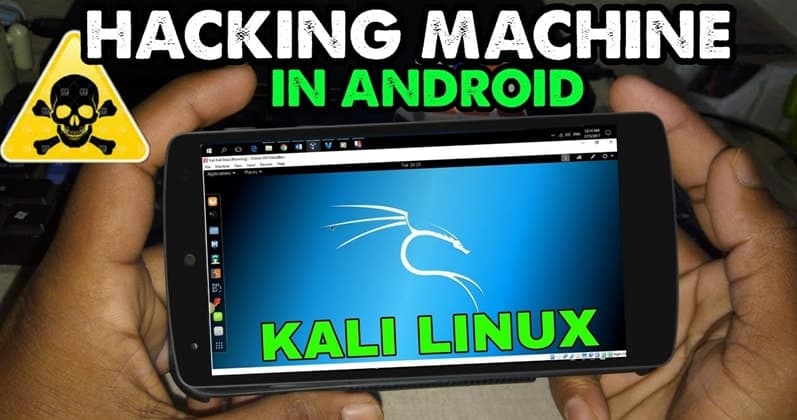
By the help of some of the knowledge of android and linux android devices can be turned into a deadly weapons for hacking and they are able to execute the various of the high end kali linux hacking tools such as Netcat, Nikto & Nmap even without rooting your android devices.
All of the created filesystems are easily disposable. Some of the tools such as Nmap gets some error during the some of the commands due to UserLand as it is a replacement project. I mentioned this because it's not a big deal as they will have some alternatives on up coming day.
For the technically inclined, UserLAnd utilizes custom scripts and executables that allow it to make the Debian and Ubuntu filesystems. One example of this is often PRoot, an open-source software that implements functionalities almost like chroot. PRoot allows you to execute programs with an alternate root directory, no root needed.
Basically there are some applications (user-space) that will have some connection through system calls of the Kernel.
With UserLAnd, PRoot is running within the background, interpreting these system calls, and it'll perform and manipulate them when necessary to emulate users and permissions within the filesystem.
We'll start by installing an SSH client, which can be the first app for interacting with the Debian OS. Then, I'll rehearse some OS setup tips and importing the Kali Linux repository to actually turn Android into a hacking device. As some readers may know, Kali Linux is predicated on the Debian OS , so importing their repository won't cause anything to interrupt or become unreliable.
Step 1 Install the ConnectBot App (Optional)
ConnectBot lets user to securely connect with SSH servers . If you do not use or have access to Google Play, ConnectBot is out there via the F-Droid repository.
Step 2 Install the UserLAnd App
I've already covered what UserLAnd is and does above, so I won't re-evaluate anything intimately here. The important thing is that you simply install it, and you'll do so using either Google Play or F-Droid.
Disclaimer: UserLAnd does have limitations. Without root access, Android's Wi-Fi interface cannot be switched into monitor mode, so traditional Wi-Fi hacking tools like Aircrack-ng won't work. However, there's still tons which will be through with UserLAnd, as you will see in future guides, and running Kali without rooting or wiping the Android OS is not any easy achievement. So make certain to offer the UserLAnd app an honest rating on Google Play — the developers totally deserve some regeneration .
Step 3 Create a New Filesystem
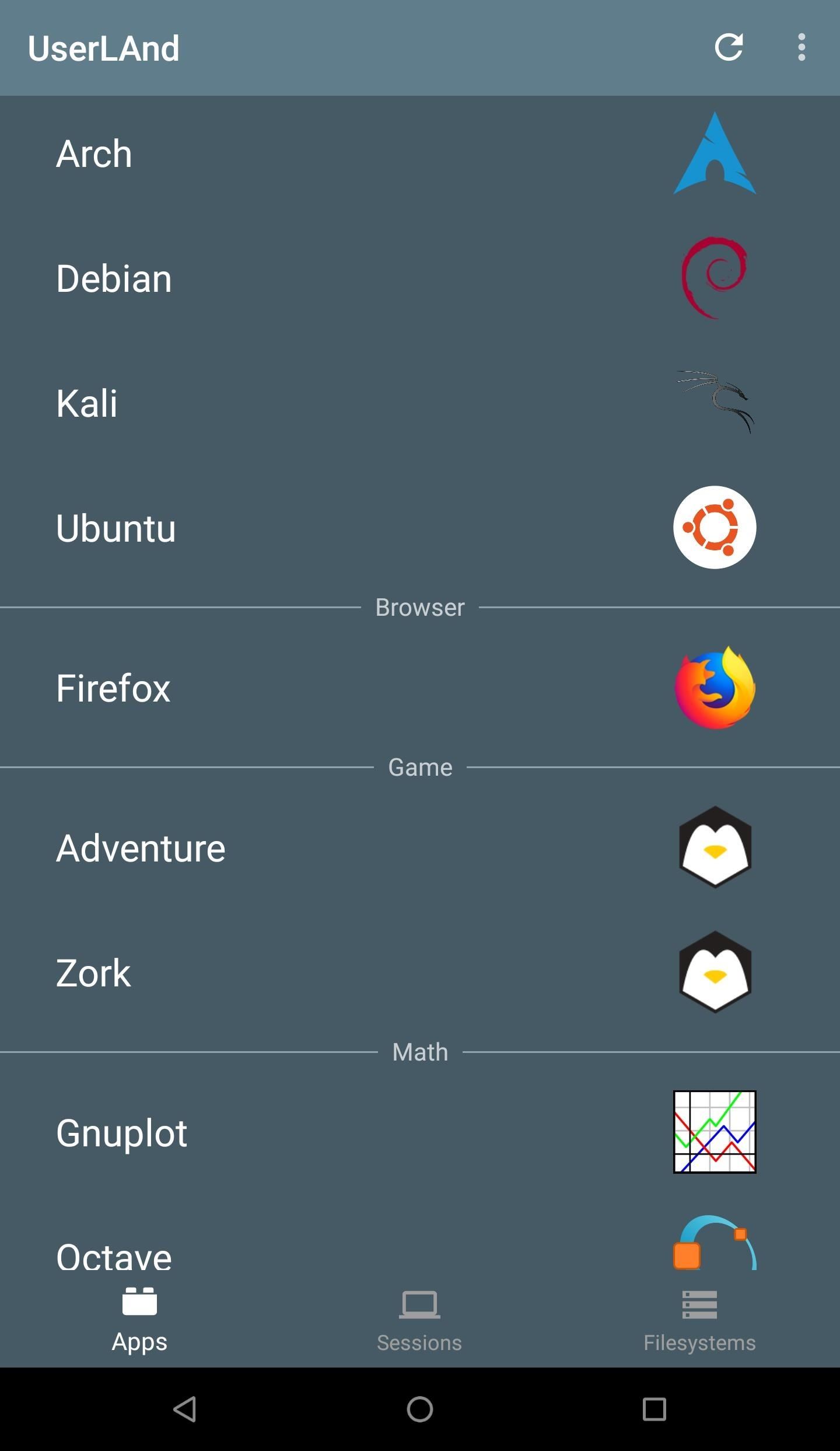
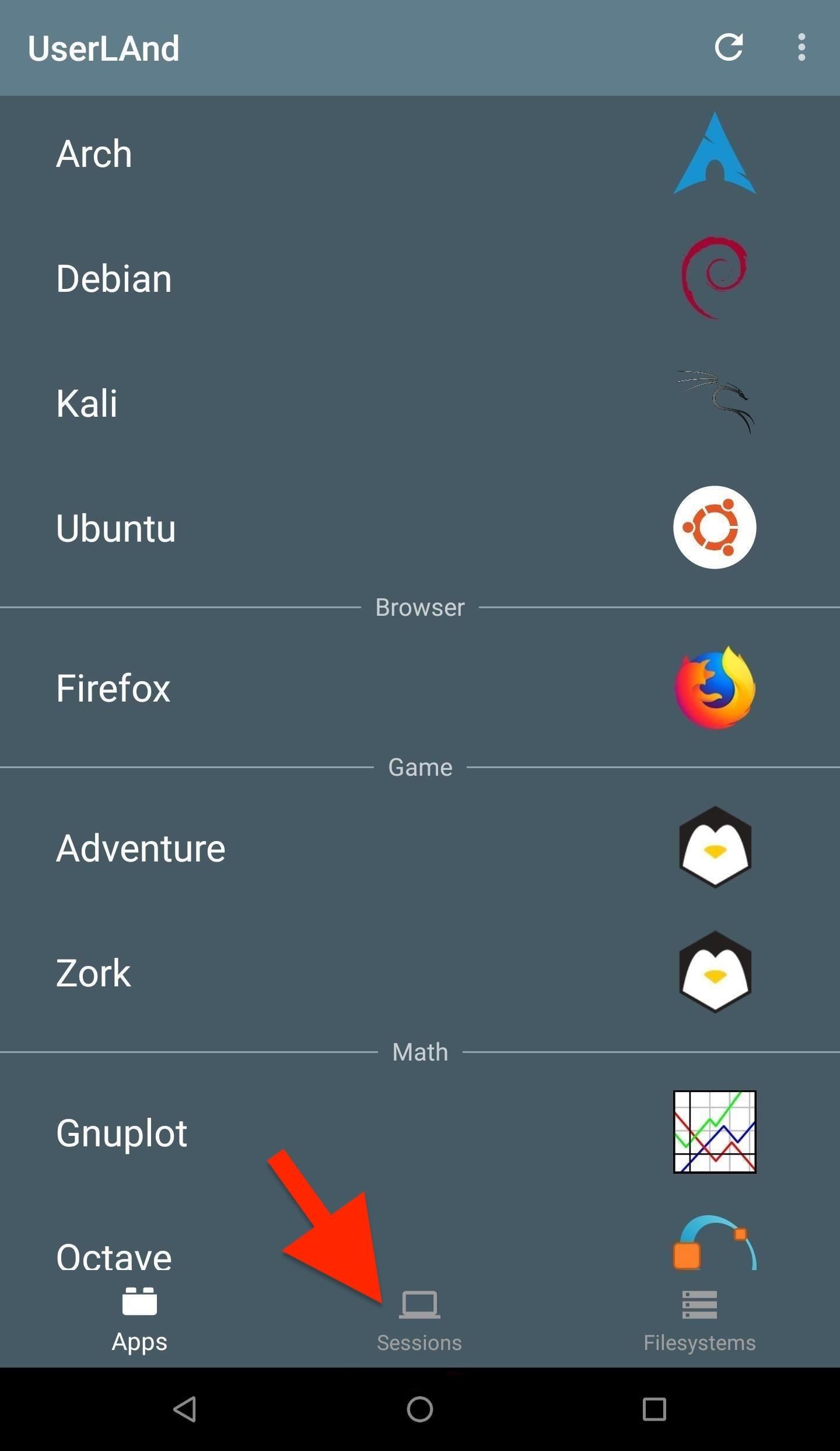
When the installation is complete, open UserLAnd, and consider the "Apps" tab. Refresh the tab and wait a couple of minutes for the distributions to populate.
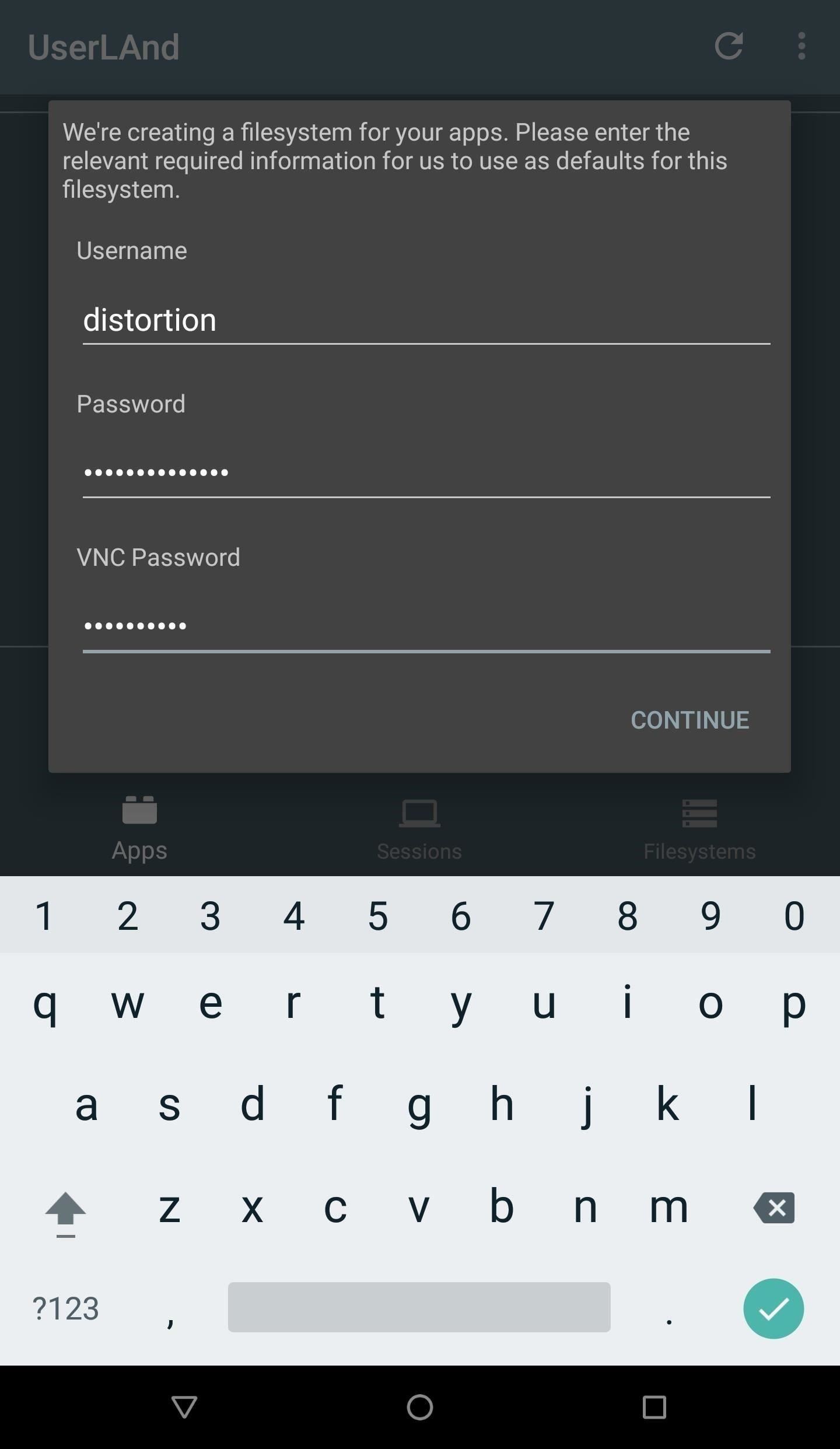
The Kali Linux OS has recently been added to the list of obtainable distributions. Select "Kali" or "Debian" and therefore the UserLAnd app will prompt for credentials. Create a username, password, and VNC password. After the completion of the installation of the file system "Password" let you to access the server of SSH. The "VNC Password" won't be utilized in this tutorial but is required to proceed with the installation.
In my first attempt, UserLAnd returned the next "Could not extract filesystem. Something went wrong" error. Removing and reinstalling the UserLAnd application appeared to resolve the difficulty . If this error persists, open a replacement GitHub issue.
Step 4 Interact with the Filesystem
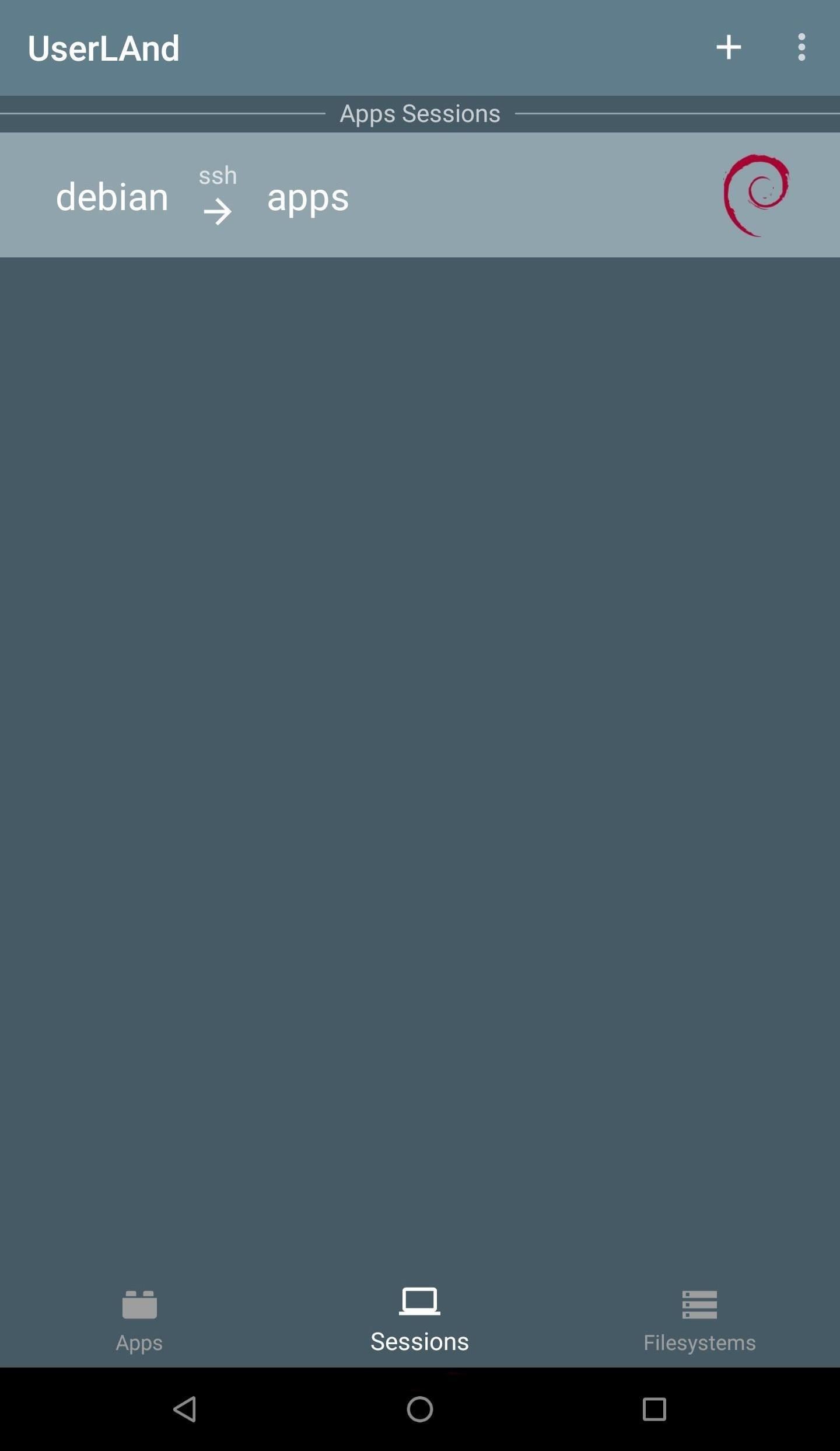
When the installation is complete, head over to the "Sessions" tab, and choose the newly created option. UserLAnd will automatically plan to open ConnectBot and ask "Are you sure you would like to continue connecting?Hit the password that you had created earlier in above step after tapping YES.
At now , syncing a Bluetooth keyboard to the phone will make fixing the OS easier, but isn't required. If you do not use a Bluetooth keyboard, i like to recommend installing Hacker's Keyboard from the Play Store, and you will see why as we continue.
Step 5 Update the OS
The first thing to do after installing a new operating system on your Android phone is making sure the system is fully up to date. This can be done by first using su to make a root shell. Next, use the
apt-get update && apt-get dist-upgrade
distortion@localhost:~$ su
root@localhost: /home/distortion# apt-get update && apt-get dist-upgrade
Ign:1 http://cdn-fastly.deb.debian.org/debian stable InRelease
Get:2 http://cdn-fastly.deb.debian.org/debian stable-updates InRelease [91.0 kB]
Hit:3 http://cdn-fastly.deb.debian.org/debian stable Release
Get:4 http://cdn-fastly.deb.debian.org/debian stable Release.gpg [2434 B]
Get:5 http://cdn-fastly.deb.debian.org/debian stable-updates/main arm64 Packages [5096 B]
Get:6 http://cdn-fastly.deb.debian.org/debian stable-updates/main Translation-en [4512 B]
Get:7 http://cdn-fastly.deb.debian.org/debian stable/main Translation-en [5393 B]
Get:8 http://cdn-fastly.deb.debian.org/debian stable/contrib arm64 Packages [29.9 kB]
Get:9 http://cdn-fastly.deb.debian.org/debian stable/contrib Translation-en [45.9 kB]
Get:10 http://cdn-fastly.deb.debian.org/debian stable/non-free arm64 Package [50.8 kB]
Get:11 http://cdn-fastly.deb.debian.org/debian stablenon-free Translation-en [80.6 kB]
Fetched 5714 kB in 31s (183 kB/s)
Reading package lists... Done
Building dependency tree... Done
Calculating upgrade... Done
The following packages will be upgraded:
tzdata
1 upgraded, 0 newly intalled, 0 to remove and 0 not upgraded.
Need to get 270 kB of archives.
After this operation, 1024 B of additional disk space will be used.
Do you want to continue? [Y/n] In the case of the above output, there's only one package that needed updating, but this might not always be true.
Step 6 Install Essential Software
This new filesystem is extremely bareboned and doesn't include considerably software by default. Below are a few of packages recommended for everyday Debian and Kali users. Some packages aren't required but will make it easier to follow along in future articles where Android is employed because the primary hacking device.
1.screen — Screen could also be a terminal multiplexer that allows users to run and alternate between several terminal sessions simultaneously. this is often one among the foremost vital packages to put in when using UserLAnd. Android phones don't handle prolonged SSH sessions well and have a tendency to interrupt connections for no apparent reason. Such breakage can cause running commands to fail with no way of reconnecting to the session to look at the progress. Use Screen to take care of persistent shell sessions.
2. net-tools — Net-tools may be a suite of tools containing ifconfig, netstat, route, and a number of other other useful networking applications.
netcat — Netcat may be a feature-rich UNIX utility designed to be a reliable tool for creating TCP and UDP connections. Netcat are often wont to create and interact with simple macOS backdoors.
3.neofetch — Neofetch (shown within the duvet photo of this article) could also be a cross-platform system operation tool. It easily shows the specification of the system you are using with the logo of distributor. there is no real function for this package apart from showing-off the distribution to coworkers and friends or creating cover photos for WonderHowTo. Neofetch could also be a touch buggy with UserLAnd distros, but you'll be wanting to know how I created the duvet photo, so I'm including it here.
4.gnupg — GnuPG (sometimes mentioned as gpg) is usually used for encrypting files and securing email communications. Some installer scripts (like Metasploit) use gpg so on import their software signing keys. It's possible to manually install Metasploit without gpg, but it'll make the method simpler .
5.curl — cURL could also be a instruction tool capable of downloading files over HTTP and other popular protocols. this is often a useful gizmo to possess for downloading files from the web .
6.wget — Like cURL, wget may be a instruction tool wont to download files from the web . Some developers prefer wget over cURL, so it's helpful to remain both installed and available.
git — Git could also be a well-liked version control software and is typically used to clone (download) GitHub projects. Git is usually recommended by Null Byte users.
7.nano — Nano could also be a instruction text editor. This makes the it lot more easier to edit the files with SSH. If Vim or Emacs is preferred, download those text-editors instead (or additionally to nano).
The above packages are often installed using the apt-get command.
apt-get update && apt-get install net-tool netcat neofetch gnupg curl wget git nano screen
Step 7 Import the Kali Linux Repository (Conditional)
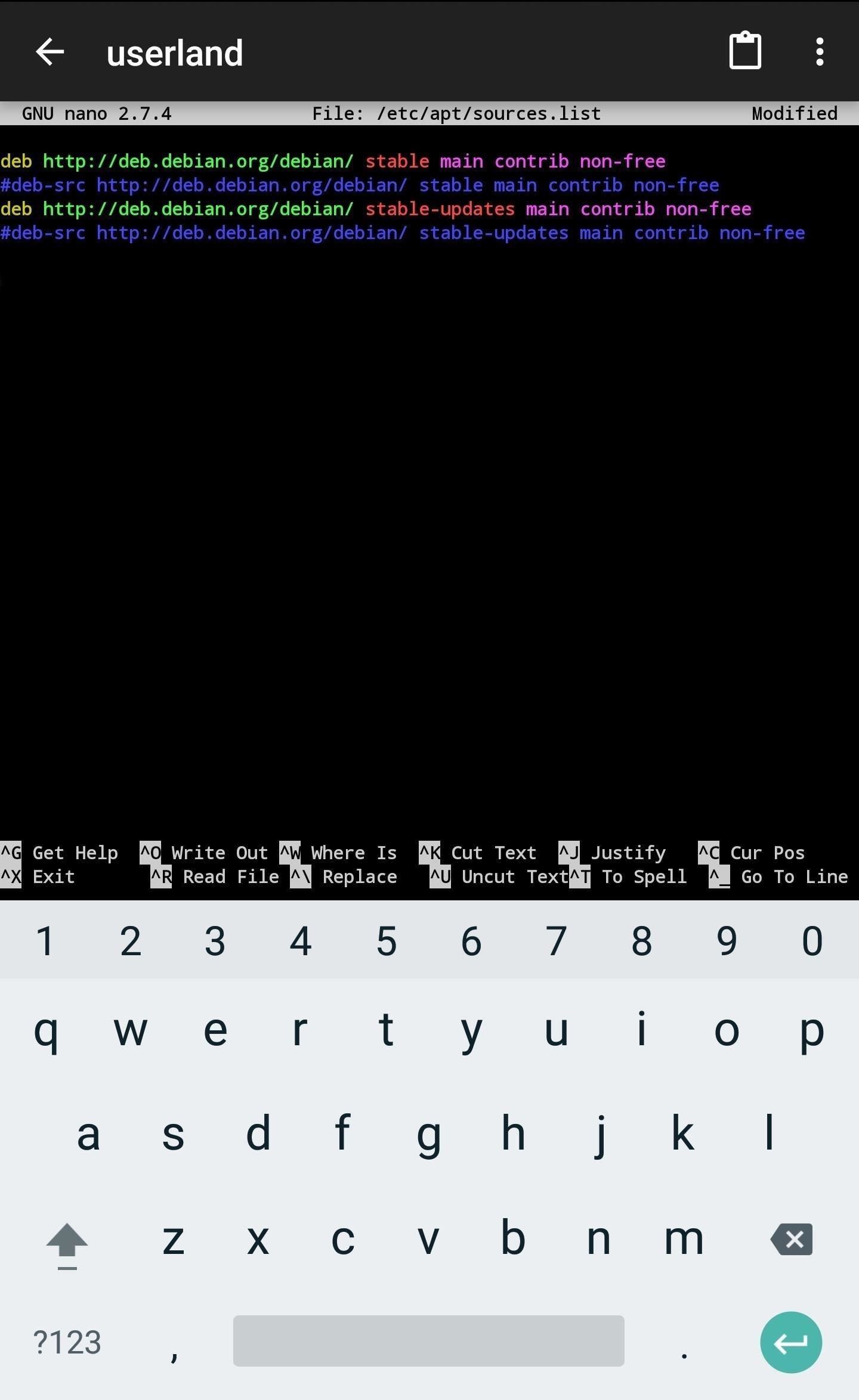
If you installed the Kali OS in Step 3, this step are often skipped.It is not mandatory for those user who are using Debian.But it will in include some of the applications which are not per installed in default repositories such as Nikto,sqlmap,Bettercap and much more of the packages.To start importing the Kali Linux repository, use nano to feature Kali's repository to the /etc/apt/sources.list file.nano /etc/apt/sources.list
Add the below line to rock bottom of the file (shown below), then use Ctrl + X to exit and save the changes. Bluetooth keyboard or the Hacker's Keyboard app will are available handy for exiting the nano terminal.
deb http://http.kali.org/kali kali-rolling main contrib non-free Then, add the Kali signing key using the next wget command.
wget -q -O - https://www.kali.org/archive-key.asc | apt-key add -
Terminal will return Ok if the command you entered goes successful.Now all you need to do is update the APT with
apt-get udate